DICOM
Configure how MySegmenter handles and displays DICOM image data.
- The
DICOMSettings panel allows users to customize how DICOM files are managed and displayed, providing flexibility in directory location, lookup tables, presets, and interpolation settings.
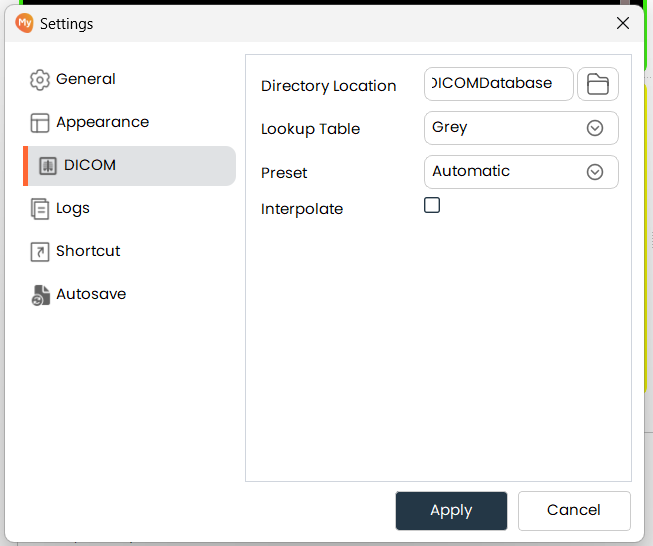
Directory Location
- Directory Location: Sets the default directory where MySegmenter looks for DICOM data.
- Click the folder icon to browse and select the desired directory.
- The selected path is shown in the text box for confirmation.
Lookup Table
- Lookup Table: Controls the color scheme applied when rendering DICOM images. Different lookup tables highlight different tissue types.
- Choose from available lookup tables such as Grey (standard grayscale) or Rainbow (pseudocolor) using the dropdown.
Preset
- Preset: Applies a predefined window/level configuration optimized for a specific anatomy or scan type.
- Select from presets such as Automatic, Bone, or Soft Tissue using the dropdown to quickly configure the display for the current dataset.
Interpolate
- Interpolate: When enabled, interpolation smooths the displayed image by averaging adjacent pixel
values, resulting in a less pixelated appearance — especially useful at high zoom levels.
- Check the Interpolate box to enable smoother image rendering.
- Uncheck it to display raw pixel values without blending, which may be preferable for precise boundary inspection.