Smoothing
Smooth the surface of segments for better quality models.
- The
Smoothingtool allows users to refine the surface of segments by applying various smoothing methods, which helps in creating more accurate and aesthetically pleasing models.
Steps:
- Choose the
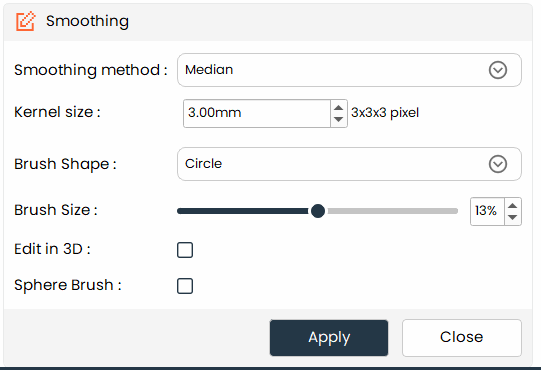
Smoothingtool from the tools panel. - Choose a smoothing algorithm from the method dropdown (see options below).
- Set the kernel size in millimeters. Larger kernels produce more aggressive smoothing
- Click and drag in the view to apply smoothing interactively to a specific area, or click Apply to smooth the entire segment. Note: interactive dragging is not available for joint smoothing.
Additional Information
Smoothing Method
-
Select the smoothing algorithm that best fits your use case:
-
Median: Reduces noise in the segment while preserving sharp boundaries between structures.
-
Opening (remove extrusions): Removes small surface protrusions and cleans up jagged segment edges.
-
Closing (fill holes): Fills small interior holes and gaps within the segment boundary.
-
Gaussian: Applies a Gaussian blur for uniform, general-purpose smoothing of the segment surface.
-
Joint smoothing: Smooths all segments simultaneously while maintaining the interfaces between adjacent anatomical structures.
-
Kernel Size
- Enter the kernel size (in mm). The equivalent value in pixels is shown below for reference.
Brush Shape
- Circle, Square, and Lasso are the main types of brush shapes you can choose from.
Brush Size
- Adjusts the diameter of Circle brushes and the side length of Square brushes. Not applicable when using the Lasso shape.
Edit in 3D
- When active, painting and erasing operations apply directly in the 3D view. This option is enabled by default for the Lasso brush
Sphere Brush
- Available for the Circle brush only. When enabled, a 3D spherical brush is used, simultaneously affecting voxels across adjacent slices — useful for volumetric editing.