Surface Cut
Perform precise surface cuts within the segments.
- The
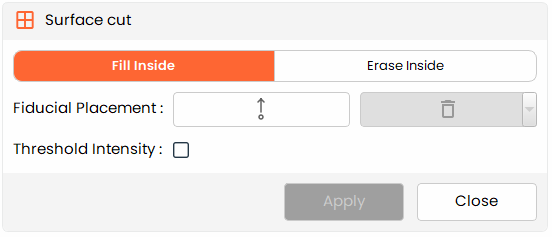
Surface Cuttool allows users to fill or erase regions within a segment by placing fiducial markers, enabling precise editing of the segment's surface.
Steps:
- Choose the
Surface Cuttool from the tools panel. - Choose Fill Inside to add voxels within the marked boundary, or Erase Inside to remove them.
- Click in the view to place fiducial markers that outline the region you want to fill or erase.
- Optionally, enable and adjust the Threshold Intensity filter to constrain the operation to a specific intensity range.
- Click Apply to execute the operation within the defined boundary.
Additional Information
Fiducial Placement
- Use the fiducial placement button to place boundary-defining markers in the view. Each click adds a new marker.
- Select a marker and click the delete button to remove it if repositioning is needed.