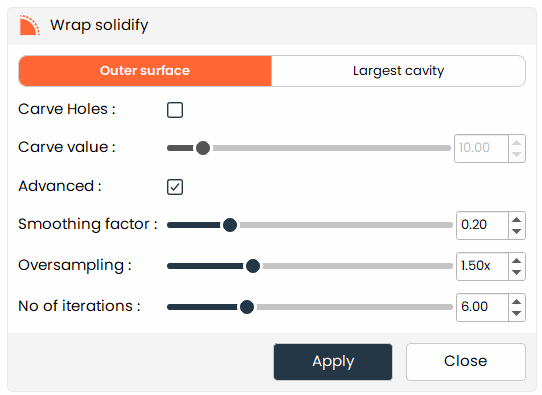
Wrap Solidify
Solidify segments by wrapping the surface to create a solid model.
- The
Wrap Solidifytool allows users to create solid models by wrapping the surface of the segment, which is useful for generating watertight models for 3D printing or further analysis.
Steps:
- Choose the
Wrap Solidifytool from the tools panel. - Choose the wrapping strategy: Outer Surface or Largest Cavity.
- (Optional) Enable Carve Holes to create openings in the solidified model.
- If Carve Holes is enabled, set the carve value to control the size of the holes.
- (Optional) Enable Advanced Settings to access additional fine-tuning parameters.
- Configure the smoothing factor (surface smoothness), oversampling (resolution), and number of iterations (processing passes) as needed.
- Click Apply to generate the solidified model.
Additional Information
Wrapping Type
- Outer surface: Wraps around the external boundary of the segment to produce a closed, solid shell.
- Largest cavity: Fills and solidifies the largest enclosed void within the segment.
Carve Holes
- When enabled, the solidification process carves defined openings into the model.
- Increase or decrease the carve value to control the diameter of the carved openings.
Advanced Settings
-
Check the Advanced box to expose additional parameters:
- Smoothing factor: Determines how aggressively the surface is smoothed during solidification.
- Oversampling: Increases the internal resolution of the wrapping computation. Higher values improve accuracy but increase processing time.
- Number of iterations: Defines how many processing passes the algorithm performs.